


If you’re trying to export Telegram chat to WhatsApp, you’re not alone. This is one of the most common questions people ask when switching messaging apps or trying to keep old conversations safe.
The reason is simple. Telegram is great for storage and flexibility. WhatsApp is where most personal and business conversations actually happen. When people decide to switch from Telegram to WhatsApp, they want their message history to come with them, not disappear into a forgotten app.
Here’s the thing, though. WhatsApp doesn’t make this easy. There’s no official one-click way to move chats across platforms. That’s why most users end up stuck halfway, exporting data but not knowing what to do next. Understanding why this happens makes the solution clearer, so let’s break that down next.
The Real Challenge Behind Telegram to WhatsApp Chat Export
On paper, Telegram to WhatsApp chat export sounds simple. Both are chat apps. Both store messages. So why not just move the data?
The issue comes down to how each platform stores and protects messages.
Telegram allows users to export chats using its desktop app. WhatsApp, on the other hand, locks chat imports tightly to protect privacy and prevent data misuse. WhatsApp only allows chat imports during initial setup and only from supported sources like Android device transfers or cloud backups.
What this really means is that even if you export Telegram chat history, WhatsApp won’t accept it directly. That’s where frustration starts and where smart workarounds matter. Before we talk about the best method, it helps to understand what the official options look like.
What Telegram and WhatsApp Officially Allow?
Telegram does one thing very well. It gives users control over their data.
Using Telegram Desktop, you can:
- Export private chats, group chats, and channels.
- Save messages, photos, videos, and files.
- Choose formats like HTML or JSON.
WhatsApp is much stricter. It does not allow:
- Direct import of third-party chat files.
- Adding old chats after setup.
- Manual upload of chat histories.
So even though you can export Telegram chat to WhatsApp in theory, WhatsApp itself blocks direct imports. This gap between platforms explains why users look for safer, readable, and long-term formats like PDF. And yes, that’s where things start to work better.
Manual Methods and Why They Fall Short
Some users try manual ways to transfer Telegram chats to WhatsApp. These methods sound workable, but usually fall apart quickly.
Common attempts include:
- Copy-pasting messages into WhatsApp chats.
- Taking screenshots of conversations.
- Exporting chats as HTML and storing them locally.
These approaches have problems:
- No search or structure.
- The media gets separated from the messages.
- Large chats become impossible to manage.
More importantly, these methods don’t scale. If you’re dealing with months or years of messages, manual handling just doesn’t hold up. That’s why converting chats into a clean, portable format becomes the smarter move.
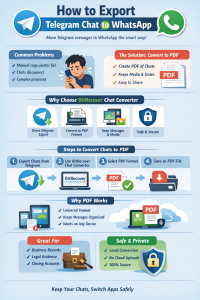
The Practical Solution: Convert Telegram Chat to PDF
If your goal is to preserve, review, or share conversations, converting Telegram chats to PDF is the most reliable option available today.
A PDF:
- Keeps message order intact.
- Preserves timestamps and sender details.
- Works on any device.
- Can be stored, shared, or printed easily.
While this doesn’t magically inject chats into WhatsApp, it gives you something WhatsApp supports indirectly. You can send PDFs through WhatsApp, store them as references, or keep them for records. For many users, that’s exactly what they need when they move Telegram messages to WhatsApp for continuity.
Let’s talk about why PDF stands out next.
Why PDF Works Better Than Other Formats
PDF is universal. That’s the key reason it works so well when trying to convert Telegram messages to WhatsApp workflows.
Here’s what makes PDF the right choice:
- No formatting breaks.
- Messages stay readable years later.
- Files don’t depend on apps or versions.
- Easy to archive on cloud or local storage.
If you’re a business user, legal professional, or someone managing client chats, PDF also gives structure and trust. Instead of messy exports, you get clean conversation records. This naturally leads to the next question. What’s the best way to do this properly?
Best Method: Using BitRecover Chat Converter
When it comes to converting Telegram chats to PDF cleanly and accurately, BitRecover Chat Converter Tool stands out as the most practical solution.
This tool is built specifically for chat data. It doesn’t just dump messages into a file. It keeps conversations readable, organized, and complete. If you’re serious about migrate Telegram chat history to WhatsApp workflows or long-term storage, this approach saves time and avoids mistakes.

Why BitRecover works well:
- Supports Telegram chat exports directly.
- Converts chats to PDF without data loss.
- Keeps media, timestamps, and usernames.
- Works on any Windows system.
Instead of juggling formats and tools, this gives you one clear path forward.
Step-by-Step: Convert Telegram Chat to PDF with BitRecover
Let’s break this down into simple steps.
- Export chats from Telegram Desktop
Use Telegram Desktop’s export feature to save chats locally. - Launch BitRecover Chat Converter
Add the exported Telegram data to the tool. - Choose PDF as the output format
This is ideal for viewing, sharing, or saving on any device. - Apply filters if needed
You can select specific chats or date ranges. - Convert and save
The tool creates clean PDF files that are ready to use.
That’s it. No scripts. No manual edits. Just usable files. Once you have these PDFs, you can store them anywhere or share them through WhatsApp as attachments.
Using PDF Files with WhatsApp
While WhatsApp doesn’t allow direct chat imports, it fully supports document sharing.
This means you can:
- Send Telegram chat PDFs in WhatsApp conversations.
- Store them in WhatsApp for reference.
- Share chat history with teammates or clients.
For many users, this solves the real problem. You don’t always need chats inside WhatsApp’s interface. You just need access to them when it matters. That’s where this method quietly works better than forced imports.
Data Safety and Accuracy
Whenever you import Telegram chat into WhatsApp indirectly, data safety matters.
BitRecover Chat Converter processes files locally. There’s no cloud upload or third-party access. That reduces privacy risks and keeps sensitive conversations under your control.
Accuracy also matters. Messages stay in order. Media stays attached. Dates don’t shift. These details matter when chats are used for work, records, or compliance.
Who This Method Is Best For
This approach works especially well for:
- Business owners save client conversations.
- Legal teams storing chat evidence.
- Users are closing Telegram accounts.
- Teams documenting group discussions.
If your goal is clean access rather than full app-level integration, converting chats to PDF is the most realistic answer available today.
Final Thoughts
If you want to export Telegram chat to WhatsApp, the smartest move isn’t forcing a direct import that doesn’t exist. It’s choosing a format that works everywhere and lasts.
PDF gives you control, clarity, and access across devices. Tools like BitRecover Chat Converter make the process straightforward and accurate, without technical headaches.
Once your chats are in PDF form, you’re no longer locked into one app. You own your data. And that’s what really matters when switching platforms.
 :
https://in.pinterest.com/bitrecoversoftware/
:
https://in.pinterest.com/bitrecoversoftware/









